
Doing what you love makes working easier.
However, even if you love your job, no day is the same and it’s not always easy to enjoy your work.
So, how can you work day in, day out with the same enthusiasm? How can you keep your customers and employees happy? And how can you have more time for other activities?
Here are 10 Tips to Make Your Work Day Easier:
Job management cannot help all aspects of your business. However, it can help improve communication, help you delegate your jobs and ensure you are organised.
With Okappy Job management you can allocate jobs to your employees and subcontractors and see the status as the jobs are completed. Key information is automatically recorded meaning less potential for disputes with clients. You can also improve communication via instant messaging between your computer and your employees and subcontractors mobile telephones.
Find out more about Okappy Job Management and how it can help make your work day easier.
Jobs reports are now managed by Okappy. With Okappy, you can easily see what jobs have been done by customer, by employee, or what jobs have been done over time.
To view jobs done by an employee over a period, select Reports, Jobs and then Jobs for Employee.
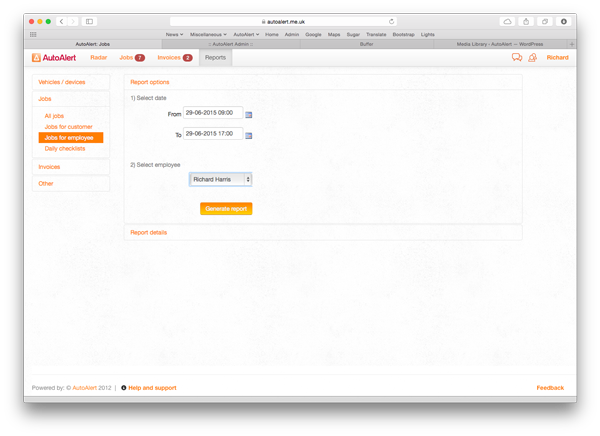
You can then select the time period and the relevant employee to view all their completed jobs.
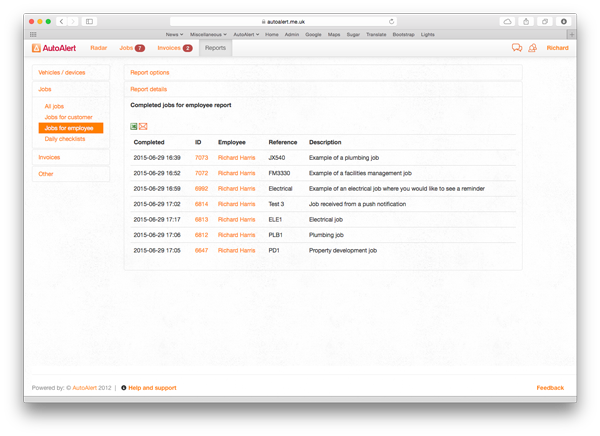
To find out about other reports, check out our help and support page or find out more about Okappy Job Management and how it can benefit your business.

As the owner of a busy electrical contracting business, getting paid on time is nearly always the biggest bug bear. Late payments, or worse, missing payments can have serious consequences on cash flow, and has even been responsible for the demise of small businesses.
The problem
When we speak to electrical contractors, about the challenges of running a business, eliminating or reducing the paperwork is on the wish list of every business owner. In fact, the paperwork can be such a challenge that any non-essential paperwork can quickly become lost or passed around from pillar to post in the hope that someone will deal with it.
The issuing of invoices is one such problem. Electricians are telling us that invoice problems range from no sending one at all (no invoice, no payment!) to not chasing up late payers and having no system in place to make sure payments are received on time.
The Solution
Cut out some of the paperwork, cut your printing and postage costs and send your invoices electronically. A system that works well in the electrical industry is to send the invoice to the customer upon completion of the job. It takes just a few clicks of a button to email the invoice straight to the customer before driving away from the job. This ensures that invoices are sent on time and is not down to one person to find time every month to send each and every invoice manually.
When managing a remote workforce it is important that an effective invoicing software program is in use to make sure employees actually use it – the two basic functions will be usability and speed.
What to look for in invoicing software
A simple reliable system that is easy to use is vital. It needs to be easily accessible by all your employees so that they actually use it. Never be tempted into free downloads. Not only are these rarely updated, but they can be full of bugs and errors and can actually cause more harm than good.
You need to make sure the software that you chose to use is supported and does what you need it to do without any costly useless features. Look out for:
A Customer database – so you can easily find customer details – no more searching for email addresses on scraps of paper!
Autofill features – sending documents should be possible in a few clicks
Integration with an accounting platform – to save time on HMRC returns
Alerts to flag late payers so that the appropriate chase up methods can be deployed.
Streamlining your invoicing function makes sense and will save hours of manually completing book-keeping statements.
Above everything else it will save you money and improve workforce management.
Or connect with us on Twitter @autoalert
Job management is now handled by Okappy.
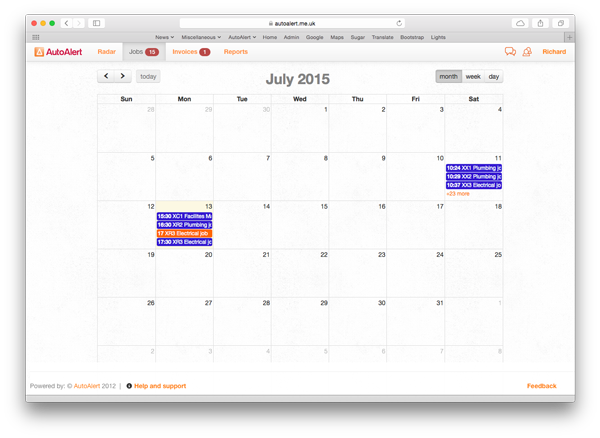
You can view the details for each job by clicking on the job. You can also add a new job from the calendar by clicking on the relevant day.
Each job is colour coded so you can see at a glance which of your employees, the job relates to.
To view your pending jobs in a calendar, click the calendar icon from the top of your jobs page.
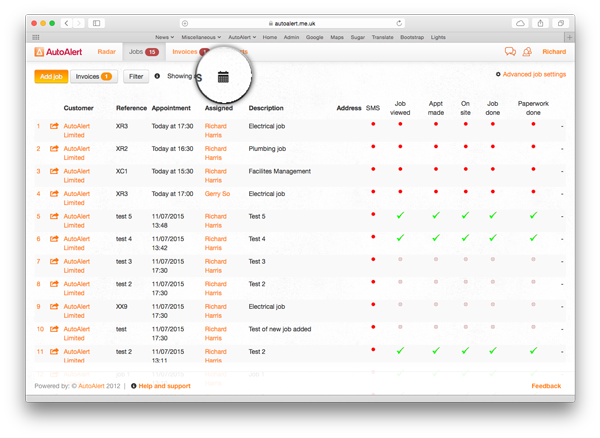
This will open the calendar view showing all your pending jobs.
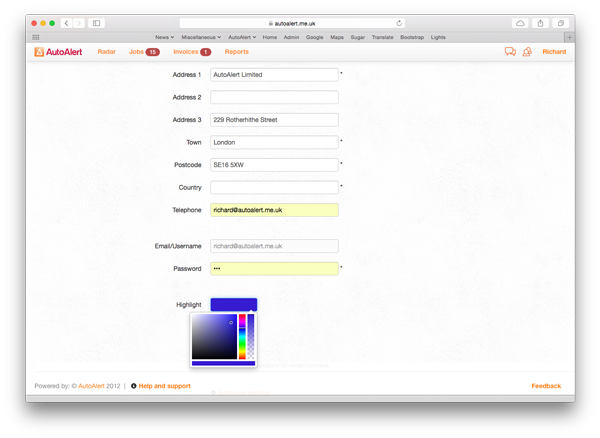
You can set different colours for each employee by clicking on the contacts icon  , selecting employees and then clicking on the highlight box at the bottom of the page.
You can select any colour and then click Update. This will change the colour of all events for that employee.
Find out more about Okappy Job Management or join the conversation and connect with us on Twitter @autoalert.

George Osborne has unveiled his budget today with one of his key initiatives being an increase in productivity for UK businesses.
Great Britain has a woeful record on productivity with statistics showing UK workers producing a lot less per hour than workers in many other industrialised economies. This doesn’t bode well as economic growth is heavily determined by productivity, even more so when we have a stable and/or ageing workforce.
But economists have been scratching their heads as the link between economic growth and productivity appears to be somewhat broken. The UK economy has performed relatively well compared to many other industrialised countries whilst our productivity growth has been lower.
No-one quite understands what’s going on. Some say it’s because the way we measure productivity is either wrong or incomplete whilst other point to the structure of the UK economy which is more heavily biased towards services.
In the UK, we have a lot more electricians, plumbers, hairdressers and consultants than say Germany which is more heavily skewed towards manufacturing.
Unfortunately, it is often more difficult to increase productivity in the service sector. Unlike in manufacturing organisations where you can buy the latest machine for your production line and watch the output per worker increase, in the service sector it is not as easy for a hairdresser to increase the number of haircuts s(he) provides, no matter how sharp her scissors.
George Osborne, the British chancellor promised to unveil a plan designed to “make Britain work better” in his Budget on 8 July. But what can really be done.
We have conducted research with a lot of our customers who work in the service sector. They range from electricians and plumbers through to security companies. The conclusions we drew was that productivity can be increased substantially, even in these industries.
In many of these industries there is still a heavy reliance on paper for job sheets, work sheets or delivery notes. Filling out these paper forms is very inefficient and time-consuming with paperwork alone often taking up at least a couple of hours for each engineer and even more for the boss of the company.
With the average time spent on a job being around an hour, spending 2 hours on paperwork means 2 jobs lost which not only costs the company money, it ultimately affects the UK’s productivity statistics.
A heavy reliance on paper often results in engineers having to come to the office to pick up their jobs each day and then bring their job sheets back at the end of the day or week. Again this means time wasted when an engineer could be working and higher costs for items such as fuel.
Using paper job sheets often also leads to missing invoices or disputes when an invoice is simply forgotten or the customer queries the amount on the invoice. This takes up time which could be better served in growing the company and leads to lost work and lost productivity.
“There are jobs that organisations are unable to automate,” says Prof Peter Fleming at Cass Business School of City University London. Jobs like flipping burgers and driving buses which though necessary are low skilled and low paid and don’t add much to the overall economic output.
But Prof Fleming also sees other factors at play. He says Britain’s workforce has been “neglected in terms of pay and conditions.”
Wages have stagnated for the past few decades and an increasing number of people are working on “zero hour contracts” where staff is hired with no guarantee of work and uncertain pay. Prof Fleming argues that this has demoralised the workforce, depriving them of incentives to work better or harder.
But there is hope. Technology is having a huge impact on the way many people work and the impact is starting to be felt in the construction, electrical contracting and plumbing sectors.
Cloud based software means that information can be shared more easily and be instantly accessible wherever your workers are. The latest job management software in particular can eradicate paper based job sheets, sending information to the engineers mobile telephone and updating the office as soon as the job is complete.
This leads to less administration, fewer mistakes and higher productivity.
When it comes to productivity, making sure your staff have the right training is also key, says Pizza Express boss Richard Hodgson “It’s a very difficult time to be an average worker,” he says. In the UK “we have seen the proliferation of any type of work – work that doesn’t add anything to the economy – just to get people off the unemployment list.”
Interested in finding out more, leave us your email and we’ll keep you up to date with our latest thought pieces.
Or get in touch on twitter.



 0207 099 5698